How to check the Python Version on Windows, Mac, Linux, Script, Command Line
Here are some method to check Python Version :
How to check the Python version using a script?
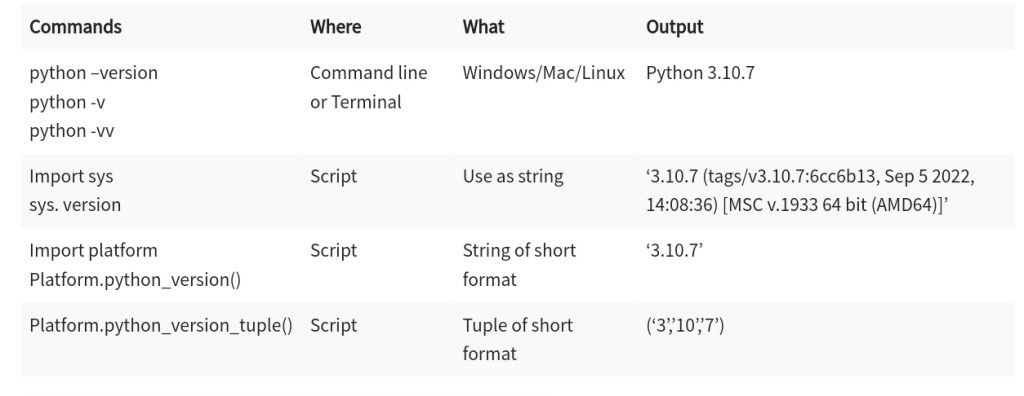
Python scripts can identify the version of Python installed on the computer. It enables you to validate if multiple versions are installed in the system. The script developed to check the Python version remains the same for windows OS, Mac OS, and Linux distributions. You can create a script by importing either the platform module or sys module of python.
The following code can be used for the sys module as shown below:
Command line Code:
import sys
sys. version
Output:
'3.10.7 (tags/v3.10.7:6cc6b13, Sep 5 2022, 14:08:36) [MSC v.1933 64 bit (AMD64)]'
Refer to the following command line screenshot:

To execute the above script, invoke python first in the command line to get the above results.
The following code can be used for the sys module as shown below:
Command line Code:
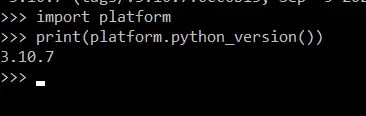
import platform
print(platform.python_version())
Output:
3.10.7
Refer to the following command line screenshot:
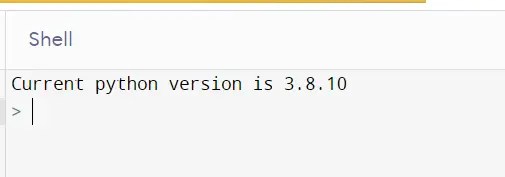
Use the following code in the web-based interpreter as shown below: –
Python code:
from platform import python_version

print("Current Python Version-", python_version())
Output:
Current Python Version- 3.8.10
Refer to the following web-based interpreter screenshot:

To get the information on the version of python, use the following script as shown below:
Python command:
print(sys.version_info)
Output
Sys.version_info(major=3, minor=10,micro=7,releaselevel=’final’,serial=0)
Screenshot

To get the tuple information on the version of python, use the following script as shown below: –
Python command
print(type(sys.version_info))
Output
<class ‘sys.version_info’>
Screenshot

To get the major information on the version of python, use the following script as shown below: –
Python command
print(sys.version_info[0])
Output
3
Screenshot

Python command
print(sys.version_info.major)
Output
3
Screenshot

To get the information on the platform python, use the following script as shown below: –
Python command
Import platform
print(platform.python_version())
Output
3.10.7
Screenshot

To get the type information on the platform version of python, use the following script as shown below: –
Python command
print(type(platform.python_version()))
Output
<class ‘str’>
Screenshot

To get the tuple information on the version of python, use the following script as shown below: –
Python command
print(platform.python_version_tuple())
Output
(‘3’,’7’,’0’)
Screenshot

Python command
- Terminal of Mac OS and Linux
- Using Python scripts.
- The version of Python can be checked by typing Python –version command.
- To validate the installation of the Python 3 version, type the command python 3 –version in the respective OS command lines.
FAQ:
❓ How do open command lines in different Operating systems?
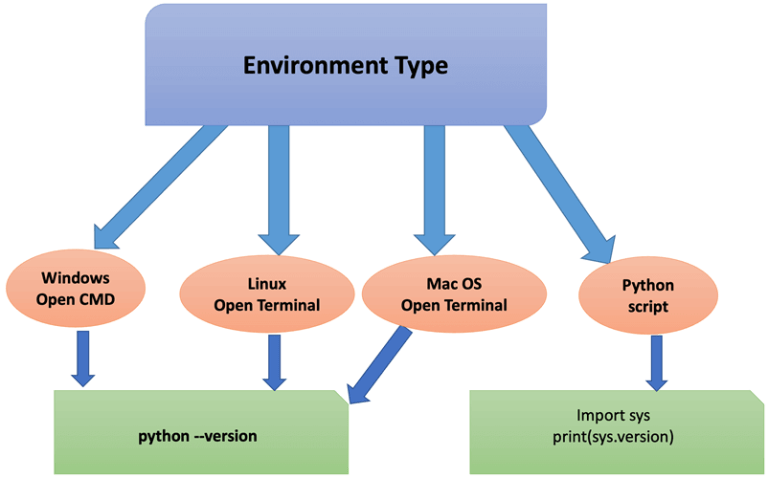
The coder can execute a single command to identify which version is installed in your computer’s operating system. You can do this by opening the command line of the operating system and typing below command as shown below:
- Linux: Ctrl + Alt + T or Ctrl + Alt + F2
- Windows: Win + R
- Mac OS: Finder > Applications > Utilities > Terminal
🏅 Perquisites for the system before Checking the Version
Here are important Perquisites for the system before checking the version:
- The user should access the command line.
- They should install the latest version of Python beforehand.
- It is also advisable to install any latest minor version of version 3 of Python. 1
- In order to validate the installed version, the user can open a command line after the installation. It is also called the Terminal in some operating systems, such as Linux and Mac OS.
My Latest Posts
• • •
• • •
 GGI Coding Verse {Old}