
Learn to code the most basic program in Python
In the last tutorial, we completed our Python installation and setup. It’s time to create your first program.
Creating First Program
Step 1) Open PyCharm Editor. You can see the introductory screen for PyCharm. To create a new project, click on “Create New Project”.

Step 2) You will need to select a location.
1). You can select the location where you want the project to be created. If you don’t want to change location than keep it as it is but at least change the name from “untitled” to something more meaningful, like “FirstProject”.
2). PyCharm should have found the Python interpreter you installed earlier.
3). Next Click the “Create” Button.

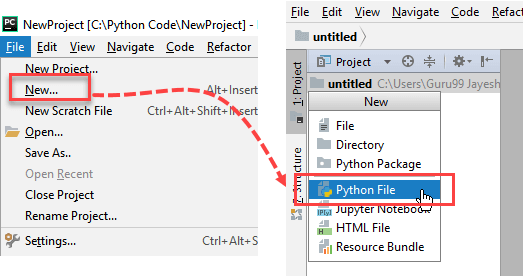
Step 3) Now Go up to the “File” menu and select “New”. Next, select “Python File”.
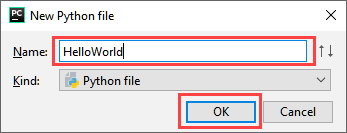
Step 4) A new pop up will appear. Now type the name of the file you want (Here we give “HelloWorld”) and hit “OK”.
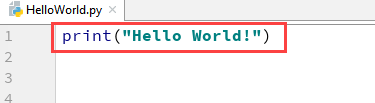
Step 5) Now type a simple program – print (‘Hello World!’).
Step 6) Now Go up to the “Run” menu and select “Run” to run your program.

Step 7) You can see the output of your program at the bottom of the screen.

Step 8) Don’t worry if you don’t have Pycharm Editor installed, you can still run the code from the command prompt. Enter the correct path of a file in command prompt to run the program.

The output of the code would be

 GGI Coding Verse {Old}